How To Use Android CursorLoader – Example

Jump To:
- Create New Android Project
- FramgmentActivity.
- Implement LoaderCallbacks interface methods.
- onCreateLoader() method.
- Set adapter to ListView.
- MainActivity.java file.
- CustomContentAdapter.java file.
- activity_main.xml file.
- Layout file for CustomContentAdapter’s element
- Get Read Contacts permission.
- AndroidManifest.xml file.
Objective
Main objective of this blog post is to give you an idea about Android CursorLoader
Introduction:
This tutorial will teach you how to use cursorloader in android. The concept of Loaders was introduced in Android 3.0 (API Level 11).
There are three key benefits of using a CursorLoader:
- The query is handled on a background thread for you (courtesy of being built on AsyncTaskLoader) so that large data queries do not block the UI. This is something the docs recommended for you to do when you’re using a plain Cursor, but now it’s done under the hood.
- CursorLoader is auto-updating. In addition to performing the initial query, CursorLoader also registers a ContentObserver with the dataset you requested and calls forceLoad() on itself when the data set changes.
- This results in getting async callbacks anytime the data changes in order to update the view.
Now follow these simple steps: Here we will create a list of all the contacts stored in an android device.
Step 1 Create New Android Project
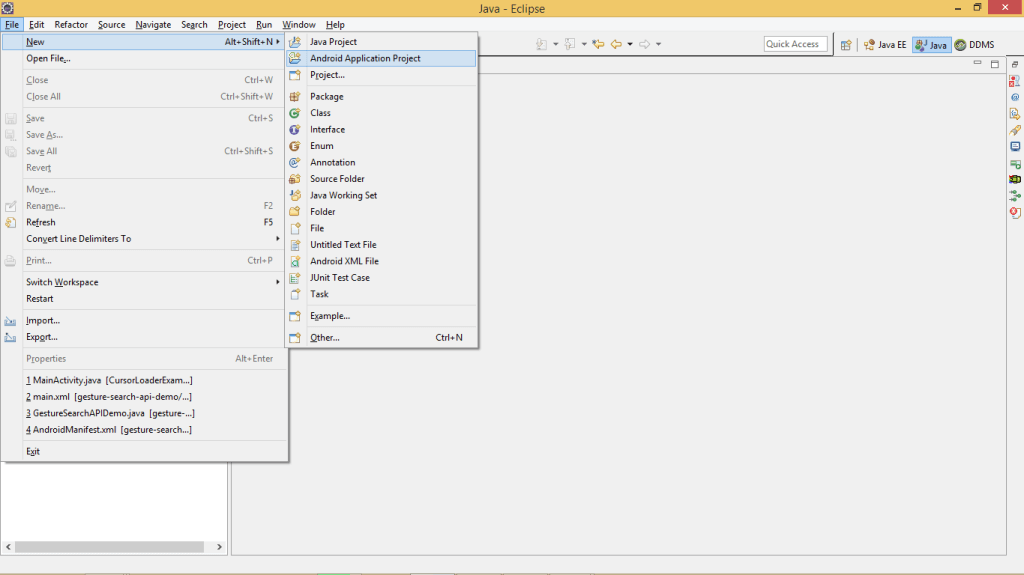
Create new Android project File >> New >> Android from the given path.
Here we have given Application name as CursorLoaderDemo. Now choose minimum required SDK level to API 11. CursorLoader is introduced in API 11, so it is available for only API 11 and greater than API 11.

Step 2 FragmentActivity
Extend your class to FragmentActivity rather than Activity or ActionBarActivity and Implement LoaderCallBack interface.
import android.database.Cursor;import android.net.Uri;import android.os.Bundle;import android.provider.ContactsContract;import android.support.v4.app.FragmentActivity;import android.support.v4.app.LoaderManager.LoaderCallbacks;import android.support.v4.content.CursorLoader;import android.support.v4.content.Loader;import android.widget.ListView;public class MainActivity extends FragmentActivity implementsLoaderCallbacks {ListView lstContact;CustomContactAdapter adapter;@Overrideprotected void onCreate(Bundle savedInstanceState) {super.onCreate(savedInstanceState);setContentView(R.layout.activity_main);lstContact = (ListView) findViewById(R.id.lstContacts);getSupportLoaderManager().initLoader(1, null, this);}
Step 3 Implement LoaderCallback interface methods
@Overridepublic Loader onCreateLoader(int arg0, Bundle arg1) {return null;}@Overridepublic void onLoadFinished(Loader arg0, Cursor cursor) {}@Overridepublic void onLoaderReset(Loader arg0) {}
More information about LoaderCallbacks interface please refer following link:
Here whenever first time CursorLoader is called, onCreateLoader method is called. To initialize CursorLoader, initLoader (int id, Bundle bundle, Context context) is used. To use this method
getSupportLoaderManager().initLoader(1, null, this);
Step 4 onCreateLoader() method
Now, fire query for all the contacts stored on the android device Fire this query in onCreateLoader method of the interface.
@Overridepublic Loader onCreateLoader(int arg0, Bundle arg1) {Uri CONTACT_URI = ContactsContract.CommonDataKinds.Phone.CONTENT_URI;CursorLoader cursorLoader = new CursorLoader(this, CONTACT_URI, null,null, null, null);return cursorLoader;}
Step 5 Set adapter to listview.
@Overridepublic void onLoadFinished(Loader arg0, Cursor cursor) {cursor.moveToFirst();adapter = new CustomContactAdapter(this, cursor);lstContact.setAdapter(adapter);}
Here, in onLoadFinished, a cursor is passed which contains all the data that we are passing to CustomContentAdapter.
@Overridepublic void onLoaderReset(Loader arg0) {}
onLoaderReset() is called when there is a change in the data source.
Step 6 MainActivity.java file
package com.tag.cursorloaderdemo;import android.database.Cursor;import android.net.Uri;import android.os.Bundle;import android.provider.ContactsContract;import android.support.v4.app.FragmentActivity;import android.support.v4.app.LoaderManager.LoaderCallbacks;import android.support.v4.content.CursorLoader;import android.support.v4.content.Loader;import android.widget.ListView;public class MainActivity extends FragmentActivity implementsLoaderCallbacks {ListView lstContact;CustomContactAdapter adapter;@Overrideprotected void onCreate(Bundle savedInstanceState) {super.onCreate(savedInstanceState);setContentView(R.layout.activity_main);lstContact = (ListView) findViewById(R.id.lstContacts);getSupportLoaderManager().initLoader(1, null, this);}@Overridepublic Loader onCreateLoader(int arg0, Bundle arg1) {Uri CONTACT_URI = ContactsContract.CommonDataKinds.Phone.CONTENT_URI;CursorLoader cursorLoader = new CursorLoader(this, CONTACT_URI, null,null, null, null);return cursorLoader;}@Overridepublic void onLoadFinished(Loader arg0, Cursor cursor) {cursor.moveToFirst();adapter = new CustomContactAdapter(this, cursor);lstContact.setAdapter(adapter);}@Overridepublic void onLoaderReset(Loader arg0) {}}
Step 7 CustomContentAdapter.java file
package com.tag.cursorloaderdemo;import android.content.Context;import android.database.Cursor;import android.graphics.Bitmap;import android.graphics.Matrix;import android.graphics.drawable.BitmapDrawable;import android.graphics.drawable.Drawable;import android.net.Uri;import android.provider.ContactsContract.CommonDataKinds.Phone;import android.provider.MediaStore;import android.view.LayoutInflater;import android.view.View;import android.view.ViewGroup;import android.widget.BaseAdapter;import android.widget.ImageView;import android.widget.LinearLayout;import android.widget.TextView;public class CustomContactAdapter extends BaseAdapter {Cursor cursor;Context mContext;LayoutInflater inflater;public CustomContactAdapter(Context context, Cursor cursor) {mContext = context;this.cursor = cursor;inflater = (LayoutInflater) mContext.getSystemService(Context.LAYOUT_INFLATER_SERVICE);}@Overridepublic int getCount() {return cursor.getCount();}@Overridepublic Object getItem(int position) {return null;}@Overridepublic long getItemId(int position) {return position;}@Overridepublic View getView(int position, View convertView, ViewGroup parent) {View view = convertView;Holder holder;cursor.moveToPosition(position);if (view == null) {view = inflater.inflate(R.layout.contact_list_element, parent,false);holder = new Holder();holder.tvCOntactName = (TextView) view.findViewById(R.id.tvContactName);holder.tvContactNumber = (TextView) view.findViewById(R.id.tvContactNumber);holder.ivContactImage = (ImageView) view.findViewById(R.id.ivContactImage);view.setTag(holder);} else {holder = (Holder) view.getTag();}holder.tvCOntactName.setText(cursor.getString(cursor.getColumnIndex(Phone.DISPLAY_NAME)));holder.tvContactNumber.setText(cursor.getString(cursor.getColumnIndex(Phone.NUMBER)));String imageUri = cursor.getString(cursor.getColumnIndex(Phone.PHOTO_URI));try {Bitmap bitmap = MediaStore.Images.Media.getBitmap(mContext.getContentResolver(), Uri.parse(imageUri));holder.ivContactImage.setImageBitmap(bitmap);scaleImage(holder.ivContactImage);} catch (Exception e) {holder.ivContactImage.setImageResource(R.drawable.contact);scaleImage(holder.ivContactImage);}return view;}class Holder {TextView tvCOntactName, tvContactNumber;ImageView ivContactImage;}private void scaleImage(ImageView imageView) {Drawable drawing = imageView.getDrawable();if (drawing == null) {}Bitmap bitmap = ((BitmapDrawable) drawing).getBitmap();int width = bitmap.getWidth();int height = bitmap.getHeight();int bounding = dpToPx(50);float xScale = ((float) bounding) / width;float yScale = ((float) bounding) / height;float scale = (xScale <= yScale) ? xScale : yScale;Matrix matrix = new Matrix();matrix.postScale(scale, scale);Bitmap scaledBitmap = Bitmap.createBitmap(bitmap, 0, 0, width, height,matrix, true);width = scaledBitmap.getWidth(); // re-useheight = scaledBitmap.getHeight(); // re-useBitmapDrawable result = new BitmapDrawable(scaledBitmap);imageView.setImageDrawable(result);LinearLayout.LayoutParams params = (LinearLayout.LayoutParams) imageView.getLayoutParams();params.width = width;params.height = height;imageView.setLayoutParams(params);}private int dpToPx(int dp) {float density = mContext.getResources().getDisplayMetrics().density;return Math.round((float) dp * density);}}
Step 8 activity_main.xml file
<RelativeLayout xmlns:android="http://schemas.android.com/apk/res/android"xmlns:tools="http://schemas.android.com/tools"android:layout_width="match_parent"android:layout_height="match_parent"android:gravity="center"tools:context="${relativePackage}.${activityClass}" ><ListViewandroid:id="@+id/lstContacts"android:layout_width="match_parent"android:layout_height="wrap_content"android:layout_centerHorizontal="true"android:layout_centerVertical="true" ></ListView></RelativeLayout>
Step 9 Layout file for CustomContentAdapter’s element
<?xml version="1.0" encoding="utf-8"?><LinearLayout xmlns:android="http://schemas.android.com/apk/res/android"android:layout_width="match_parent"android:layout_height="match_parent"android:gravity="center_vertical"android:orientation="vertical" ><LinearLayoutandroid:layout_width="match_parent"android:layout_height="wrap_content"android:layout_gravity="center_vertical"android:orientation="horizontal" ><LinearLayoutandroid:layout_width="wrap_content"android:layout_height="match_parent" ><ImageViewandroid:id="@+id/ivContactImage"android:layout_width="wrap_content"android:layout_height="wrap_content"android:scaleType="fitCenter"android:src="@drawable/ic_launcher" /></LinearLayout><LinearLayoutandroid:layout_width="0dp"android:layout_height="match_parent"android:layout_gravity="center"android:layout_weight="0.4"android:orientation="vertical" ><TextViewandroid:layout_width="wrap_content"android:layout_height="wrap_content"android:layout_gravity="center"android:text="Name"android:textAppearance="?android:attr/textAppearanceSmall" /><TextViewandroid:id="@+id/tvContactName"android:layout_width="wrap_content"android:layout_height="wrap_content"android:layout_gravity="center"android:text="Medium Text"android:textAppearance="?android:attr/textAppearanceMedium" /></LinearLayout><LinearLayoutandroid:layout_width="0dp"android:layout_height="match_parent"android:layout_gravity="center"android:layout_weight="0.3"android:orientation="vertical" ><TextViewandroid:layout_width="wrap_content"android:layout_height="wrap_content"android:layout_gravity="center"android:text="Number"android:textAppearance="?android:attr/textAppearanceSmall" /><TextViewandroid:id="@+id/tvContactNumber"android:layout_width="wrap_content"android:layout_height="wrap_content"android:layout_gravity="center"android:text="Medium Text"android:textAppearance="?android:attr/textAppearanceMedium" /></LinearLayout></LinearLayout></LinearLayout>
Step 10 Get Read Contacts permission
<uses-permission android:name="android.permission.READ_CONTACTS" />
Step 11 AndroidManifest.xml
<?xml version="1.0" encoding="utf-8"?><manifest xmlns:android="http://schemas.android.com/apk/res/android"package="com.tag.cursorloaderdemo"android:versionCode="1"android:versionName="1.0" ><uses-sdkandroid:minSdkVersion="11"android:targetSdkVersion="21" /><uses-permission android:name="android.permission.READ_CONTACTS" /><applicationandroid:allowBackup="true"android:icon="@drawable/ic_launcher"android:label="@string/app_name"android:theme="@style/AppTheme" ><activityandroid:name=".MainActivity"android:label="@string/app_name" ><intent-filter><action android:name="android.intent.action.MAIN" /><category android:name="android.intent.category.LAUNCHER" /></intent-filter></activity></application></manifest>

I hope you find this blog very helpful while working with Android CursorLoader. Let me know in comment if you have any question regarding Android CursorLoader. I will reply you ASAP.
Got an Idea of Android App Development? What are you still waiting for? Contact us now and see the Idea live soon. Our company has been named as one of the best Android App Development Company in India.
– See more at: http://www.theappguruz.com/blog/use-android-cursorloader-example#sthash.IMoXdAbH.dpuf


